> ## Documentation Index
> Fetch the complete documentation index at: https://datagen.dev/llms.txt
> Use this file to discover all available pages before exploring further.
# Vault
> Store API keys, tokens and MCP server logins once in a Connection Vault, and let agents, contexts and apps use them without ever seeing them in code
A **Connection Vault** is a workspace-scoped container for credentials. Each
credential is one *slot*: either an **MCP server** your agents call tools on, or
a **Secret** (API key, token, password, signing secret) that DataGen injects into
the sandbox as an environment variable at run time.
Credentials never appear in code, prompts, or git. Admins set shared values
once; members use them without seeing them. Values a member must own personally
\-- their database password, their Gmail login -- are filled in by each member.
## Vaults in a workspace
Every workspace has a **Default** vault. Anything that does not pin a vault
(an agent left on **Workspace default**, an API key that is not pinned to a
vault) uses it. Create more vaults to keep credential sets apart -- for example
`production` and `staging`, or one vault per team.
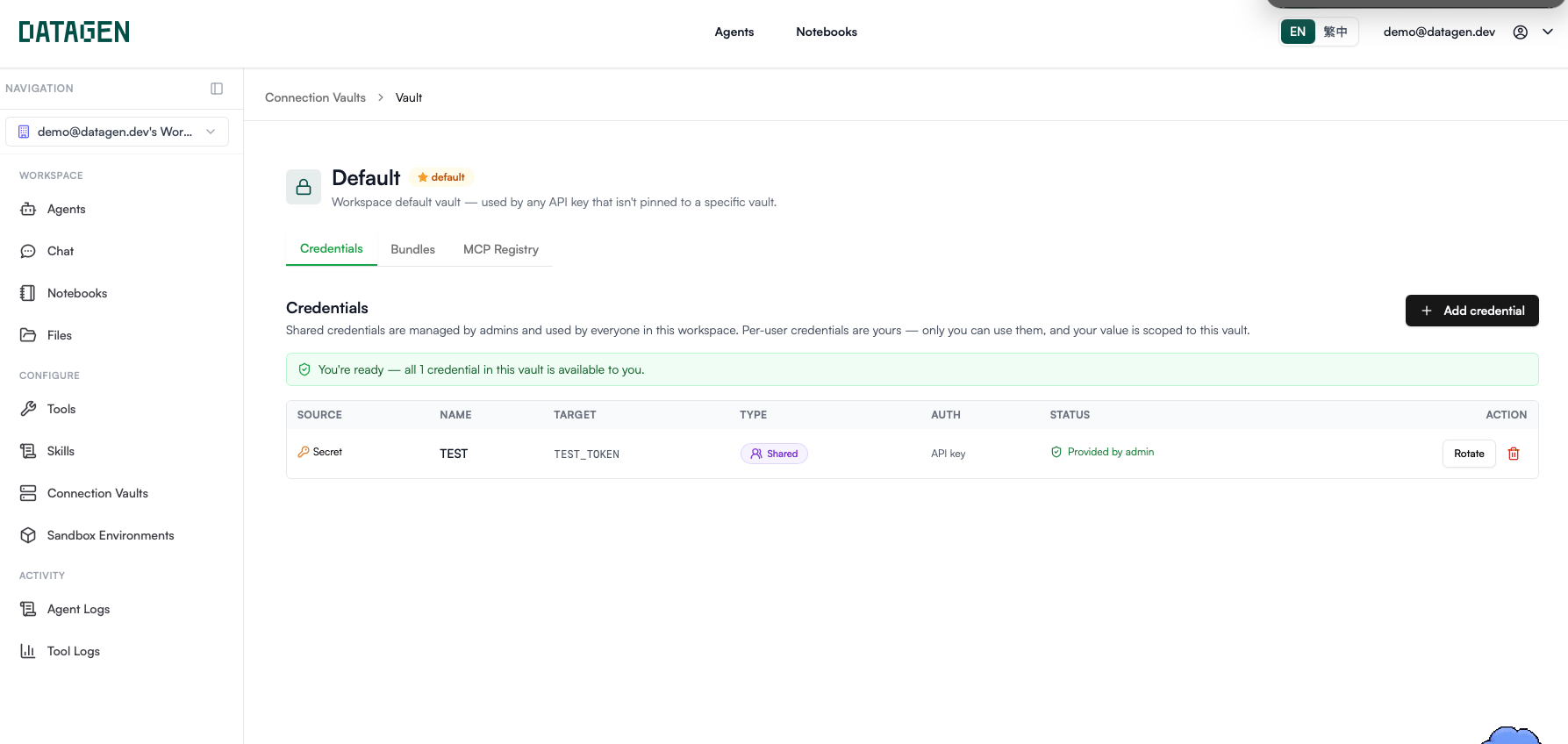 Open **Connection Vaults** from the left rail (the **Vaults** icon). Each vault
has these tabs:
| Tab | What it holds |
| - | - |
| **Credentials** | The credential slots: MCP servers and Secrets. |
| **Tool Bundles** | Tool allowlists that authenticate with this vault's credentials. See [Tools](/agents/tools). |
| **MCP Registry** | A catalog of MCP servers you can add to this vault. |
### Create a vault
Open **Connection Vaults** and click **New vault**.
Enter a **Name** (for example `production`; unique within the workspace) and
an optional **Description (optional)**.
Click **Create vault**, then open the vault to add credentials.
***
## Add a credential
Open a vault, go to the **Credentials** tab and click **Add credential**.
Open **Connection Vaults** from the left rail (the **Vaults** icon). Each vault
has these tabs:
| Tab | What it holds |
| - | - |
| **Credentials** | The credential slots: MCP servers and Secrets. |
| **Tool Bundles** | Tool allowlists that authenticate with this vault's credentials. See [Tools](/agents/tools). |
| **MCP Registry** | A catalog of MCP servers you can add to this vault. |
### Create a vault
Open **Connection Vaults** and click **New vault**.
Enter a **Name** (for example `production`; unique within the workspace) and
an optional **Description (optional)**.
Click **Create vault**, then open the vault to add credentials.
***
## Add a credential
Open a vault, go to the **Credentials** tab and click **Add credential**.
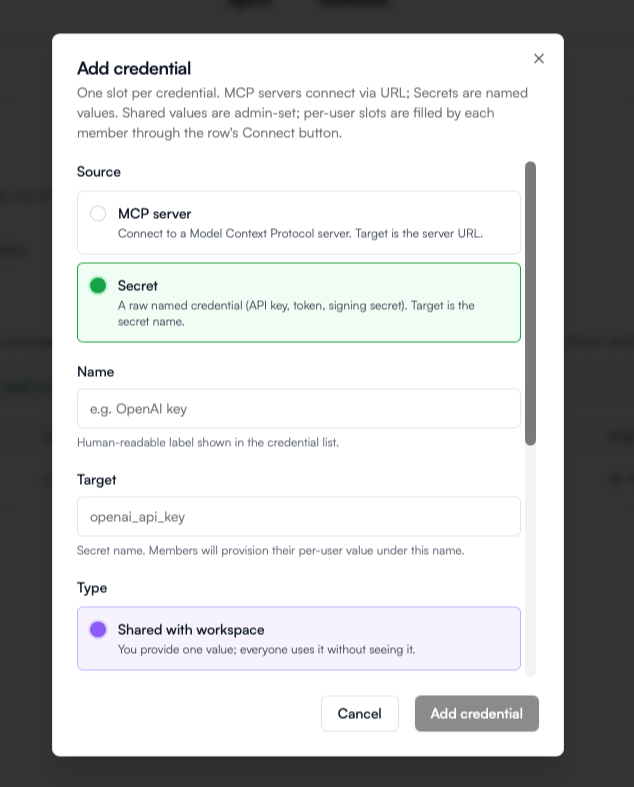 ### Fields
| Field | Applies to | What it does |
| - | - | - |
| **Source** | All | **MCP server** -- a Model Context Protocol server; the Target is its URL. **Secret** -- a raw named value; the Target is its name. |
| **Name** | All | Human-readable label shown in the credential list, e.g. `OpenAI key`. |
| **Key** | MCP server | Your name for this credential, unique in the vault. Use it to tell accounts on the same server apart, e.g. `gmail-work` vs `gmail-personal`. Pre-filled from the Name. |
| **Target** | All | For an MCP server: its URL (`http://` or `https://`). If the vault has no connector for that URL yet, one is created with the credential. For a Secret: the **environment variable name** the value is injected under (see [How a Secret becomes an env var](#how-a-secret-becomes-an-env-var)). |
| **Auth method** | All | **OAuth**, **Bearer token**, **API key**, or **No authentication**. MCP servers default to OAuth. For a Secret, the value is injected as-is; API key is the usual choice. |
| **Type** | All | **Shared with workspace** or **Per-user** (see below). |
| **Value** | Shared only | The credential itself. Encrypted at rest; members can use it but never see it. Not asked for OAuth or No authentication. |
| **Allow members to use their own token** | Shared only | A member who provisions their own value uses it for their own runs; everyone else keeps using the shared value. |
| **Where can it be sent?** | Secret, when available | The egress policy for this secret. See [Egress policies](#egress-policies). |
### Shared vs Per-user
Decide with one question: *is this value the same for every member?*
You provide one value; everyone uses it without seeing it. Use it for
service accounts, company API keys, and connection details such as a database
host or port.
The slot is only a declaration. Each member sees the row with a **Connect**
button and fills in their own value. Use it for personal logins, personal
database roles, and OAuth.
* Per-user values are **scoped to the vault**: a member's value here is separate
from their value for the same name in another vault.
* **OAuth is always Per-user.** Selecting OAuth switches the Type to Per-user;
each member runs the consent flow themselves.
* **Shared + Allow members to use their own token** covers the in-between case:
one shared token by default, but a developer's runs use their own token once
they click **Use my own token** on the row.
### Fill in a Per-user value
On a Per-user row, click **Connect** (or **Update** to replace your value):
* **OAuth** -- a popup opens for you to sign in with the provider. DataGen stores
your access and refresh tokens, encrypted and scoped to this vault. Your
provider password is never stored. Allow popups for the site if the popup is
blocked.
* **API key / Bearer token** -- paste your value. Only you can use it; admins and
other members never see it.
### Status column
| Status | Meaning |
| - | - |
| **Provided by admin** | A Shared value is set. |
| **Admin hasn't set value** | A Shared slot has no value yet. Only an admin can fix it. |
| **Connected as you** | You filled in this Per-user slot. |
| **Not connected** | You have not filled in this Per-user slot yet. |
| **Using your token** | A Shared slot that allows overrides is using your own value. |
| **No credential needed** | The slot uses No authentication. |
The banner above the table tells you whether every credential in the vault is
available to you, or how many need attention.
***
## How a Secret becomes an env var
When an agent, context builder, or app starts a sandbox, DataGen resolves every
**Secret** slot in its vault and exports each one as an environment variable.
The **Target** is the variable name, normalized two ways:
* hyphens become underscores
* the name is uppercased
| Target | Env var in the sandbox |
| - | - |
| `OPENAI_API_KEY` | `OPENAI_API_KEY` |
| `openai_api_key` | `OPENAI_API_KEY` |
| `stripe-secret` | `STRIPE_SECRET` |
Write Targets in the exact uppercase form your code or library reads, for
example `PGHOST` or `OPENAI_API_KEY`, so the vault table matches what the code
sees. Code reads them like any other variable:
```python theme={null}
import os
api_key = os.environ["OPENAI_API_KEY"]
```
**MCP server** credentials are not exported as env vars. DataGen attaches them
when an agent calls a tool on that server; the [tool bundle](/agents/tools)
decides which of the vault's tools an agent may call.
***
## Rotate, update and delete
| Action | Who | What happens |
| - | - | - |
| **Rotate** (Shared row) | Admin | Paste a **New value**. The encrypted value is replaced and the previous value is unrecoverable. Runs already executing keep the old value until they finish; new runs pick up the new value automatically. |
| **Update** (Per-user row) | The member | Replaces your own value. For OAuth, this re-runs the consent flow -- OAuth tokens cannot be rotated by pasting a string. |
| **Delete** (trash icon) | Admin | Removes the slot for everyone. The dialog lists the agents bound to this vault; type the credential name to confirm. Per-user values for the slot are lost. |
Rotate a credential whenever its value was pasted into a chat, log, or ticket.
Nothing needs redeploying -- the next run reads the new value.
### Roles
| Role | Can |
| - | - |
| **Admin** | Everything: create vaults, add credentials, rotate Shared values, delete credentials, curate tool bundles, **Refresh tools**. |
| **Builder** | Create vaults and add credentials. Cannot rotate or delete existing Shared credentials. |
| **Operator** | Fill in and update their own Per-user values and personal overrides. |
| **Viewer** | Read only. |
***
## Egress policies
Egress policies take effect only on deployments that run DataGen's egress
proxy with the feature enabled for your account. Where that is not the case,
the **Sent to** column and the **Where can it be sent?** field are hidden, or
the dialog shows a **Not active** notice and every secret reaches agents as-is.
An egress policy decides whether code in the sandbox can read a secret's real
value. With a policy, the agent sees a stand-in, and DataGen swaps the real value
in on the way out -- only for the hosts you allow. Set it in the **Sent to**
column of a Secret row, or in **Where can it be sent?** when adding one:
| Mode | Effect |
| - | - |
| **Only these hosts** | The stand-in is swapped for the real value only on requests to the listed **Hosts (one per line)**, e.g. `api.example.com` or `*.example.com`. |
| **Any host (hide the value)** | The value never appears in the sandbox, but any code holding the stand-in can still send it to any site. |
| **Give the value as-is** | The agent reads the real value and can send it anywhere. |
| **Use the built-in setting** | DataGen's default for that variable name applies. (When adding a credential, the equivalent no-change option is **Keep the current setting**.) |
* Only header and query-string values are swapped. A secret sent inside a request
body, a signing secret, or a database connection string is always given as-is.
* A policy applies to **every secret with that variable name in the workspace**,
across all vaults.
* Changes apply from the agent's next turn.
***
## How agents, contexts and apps use a vault
| Where | Setting | When left unset |
| - | - | - |
| **Agent** | **Vault & Tool Bundle** card -> **Vault**, then **Save vault & bundle** | **Workspace default** -- the Default vault |
| **Context builder** | Context settings -> **Vault** | **Workspace default** -- the Default vault |
| **App** | App Builder -> **Connection Vault** | **No vault** -- the app receives no credentials |
| **Data builder** | Data -> **Builder configuration** -> **Vault** | -- |
| **Harness** | **Auth token secret** for a custom LLM provider | See [Harness](/foundation/harness) |
* An **agent run** resolves Per-user values for the member the run runs as.
* An **app** resolves the vault as the member who opens it, Per-user slots
included, so each member's app session uses their own values.
***
## Gotchas
A run resolves **every Secret slot** in its vault before the sandbox starts.
If any slot has no value for the member the run runs as -- an empty Shared
slot, or a Per-user slot that member never connected -- the run fails fast
with `Vault not ready: `. Fill in the listed slots on the vault page
and re-run. Keep vaults focused: a Per-user slot that only one agent needs
still blocks every agent on that vault for members who have not filled it.
Check the Target: it is uppercased and hyphens become underscores, so
`my-key` arrives as `MY_KEY`. Also confirm the agent, context, or app is
bound to the vault that holds the slot -- an app with **No vault** gets
nothing.
The vault slot wins. Workspace secrets (Workspace settings -> **Secrets**)
only fill names the vault does not already provide.
OAuth credentials are Per-user. To share one account across the workspace,
choose another auth method such as Bearer token or API key.
## Next
Bake the packages your agents' code needs into a reusable image.
A worked example: store `PG*` secrets in the vault and query Postgres.
This documentation is built and hosted on [Mintlify](https://mintlify.com), a developer documentation platform.
### Fields
| Field | Applies to | What it does |
| - | - | - |
| **Source** | All | **MCP server** -- a Model Context Protocol server; the Target is its URL. **Secret** -- a raw named value; the Target is its name. |
| **Name** | All | Human-readable label shown in the credential list, e.g. `OpenAI key`. |
| **Key** | MCP server | Your name for this credential, unique in the vault. Use it to tell accounts on the same server apart, e.g. `gmail-work` vs `gmail-personal`. Pre-filled from the Name. |
| **Target** | All | For an MCP server: its URL (`http://` or `https://`). If the vault has no connector for that URL yet, one is created with the credential. For a Secret: the **environment variable name** the value is injected under (see [How a Secret becomes an env var](#how-a-secret-becomes-an-env-var)). |
| **Auth method** | All | **OAuth**, **Bearer token**, **API key**, or **No authentication**. MCP servers default to OAuth. For a Secret, the value is injected as-is; API key is the usual choice. |
| **Type** | All | **Shared with workspace** or **Per-user** (see below). |
| **Value** | Shared only | The credential itself. Encrypted at rest; members can use it but never see it. Not asked for OAuth or No authentication. |
| **Allow members to use their own token** | Shared only | A member who provisions their own value uses it for their own runs; everyone else keeps using the shared value. |
| **Where can it be sent?** | Secret, when available | The egress policy for this secret. See [Egress policies](#egress-policies). |
### Shared vs Per-user
Decide with one question: *is this value the same for every member?*
You provide one value; everyone uses it without seeing it. Use it for
service accounts, company API keys, and connection details such as a database
host or port.
The slot is only a declaration. Each member sees the row with a **Connect**
button and fills in their own value. Use it for personal logins, personal
database roles, and OAuth.
* Per-user values are **scoped to the vault**: a member's value here is separate
from their value for the same name in another vault.
* **OAuth is always Per-user.** Selecting OAuth switches the Type to Per-user;
each member runs the consent flow themselves.
* **Shared + Allow members to use their own token** covers the in-between case:
one shared token by default, but a developer's runs use their own token once
they click **Use my own token** on the row.
### Fill in a Per-user value
On a Per-user row, click **Connect** (or **Update** to replace your value):
* **OAuth** -- a popup opens for you to sign in with the provider. DataGen stores
your access and refresh tokens, encrypted and scoped to this vault. Your
provider password is never stored. Allow popups for the site if the popup is
blocked.
* **API key / Bearer token** -- paste your value. Only you can use it; admins and
other members never see it.
### Status column
| Status | Meaning |
| - | - |
| **Provided by admin** | A Shared value is set. |
| **Admin hasn't set value** | A Shared slot has no value yet. Only an admin can fix it. |
| **Connected as you** | You filled in this Per-user slot. |
| **Not connected** | You have not filled in this Per-user slot yet. |
| **Using your token** | A Shared slot that allows overrides is using your own value. |
| **No credential needed** | The slot uses No authentication. |
The banner above the table tells you whether every credential in the vault is
available to you, or how many need attention.
***
## How a Secret becomes an env var
When an agent, context builder, or app starts a sandbox, DataGen resolves every
**Secret** slot in its vault and exports each one as an environment variable.
The **Target** is the variable name, normalized two ways:
* hyphens become underscores
* the name is uppercased
| Target | Env var in the sandbox |
| - | - |
| `OPENAI_API_KEY` | `OPENAI_API_KEY` |
| `openai_api_key` | `OPENAI_API_KEY` |
| `stripe-secret` | `STRIPE_SECRET` |
Write Targets in the exact uppercase form your code or library reads, for
example `PGHOST` or `OPENAI_API_KEY`, so the vault table matches what the code
sees. Code reads them like any other variable:
```python theme={null}
import os
api_key = os.environ["OPENAI_API_KEY"]
```
**MCP server** credentials are not exported as env vars. DataGen attaches them
when an agent calls a tool on that server; the [tool bundle](/agents/tools)
decides which of the vault's tools an agent may call.
***
## Rotate, update and delete
| Action | Who | What happens |
| - | - | - |
| **Rotate** (Shared row) | Admin | Paste a **New value**. The encrypted value is replaced and the previous value is unrecoverable. Runs already executing keep the old value until they finish; new runs pick up the new value automatically. |
| **Update** (Per-user row) | The member | Replaces your own value. For OAuth, this re-runs the consent flow -- OAuth tokens cannot be rotated by pasting a string. |
| **Delete** (trash icon) | Admin | Removes the slot for everyone. The dialog lists the agents bound to this vault; type the credential name to confirm. Per-user values for the slot are lost. |
Rotate a credential whenever its value was pasted into a chat, log, or ticket.
Nothing needs redeploying -- the next run reads the new value.
### Roles
| Role | Can |
| - | - |
| **Admin** | Everything: create vaults, add credentials, rotate Shared values, delete credentials, curate tool bundles, **Refresh tools**. |
| **Builder** | Create vaults and add credentials. Cannot rotate or delete existing Shared credentials. |
| **Operator** | Fill in and update their own Per-user values and personal overrides. |
| **Viewer** | Read only. |
***
## Egress policies
Egress policies take effect only on deployments that run DataGen's egress
proxy with the feature enabled for your account. Where that is not the case,
the **Sent to** column and the **Where can it be sent?** field are hidden, or
the dialog shows a **Not active** notice and every secret reaches agents as-is.
An egress policy decides whether code in the sandbox can read a secret's real
value. With a policy, the agent sees a stand-in, and DataGen swaps the real value
in on the way out -- only for the hosts you allow. Set it in the **Sent to**
column of a Secret row, or in **Where can it be sent?** when adding one:
| Mode | Effect |
| - | - |
| **Only these hosts** | The stand-in is swapped for the real value only on requests to the listed **Hosts (one per line)**, e.g. `api.example.com` or `*.example.com`. |
| **Any host (hide the value)** | The value never appears in the sandbox, but any code holding the stand-in can still send it to any site. |
| **Give the value as-is** | The agent reads the real value and can send it anywhere. |
| **Use the built-in setting** | DataGen's default for that variable name applies. (When adding a credential, the equivalent no-change option is **Keep the current setting**.) |
* Only header and query-string values are swapped. A secret sent inside a request
body, a signing secret, or a database connection string is always given as-is.
* A policy applies to **every secret with that variable name in the workspace**,
across all vaults.
* Changes apply from the agent's next turn.
***
## How agents, contexts and apps use a vault
| Where | Setting | When left unset |
| - | - | - |
| **Agent** | **Vault & Tool Bundle** card -> **Vault**, then **Save vault & bundle** | **Workspace default** -- the Default vault |
| **Context builder** | Context settings -> **Vault** | **Workspace default** -- the Default vault |
| **App** | App Builder -> **Connection Vault** | **No vault** -- the app receives no credentials |
| **Data builder** | Data -> **Builder configuration** -> **Vault** | -- |
| **Harness** | **Auth token secret** for a custom LLM provider | See [Harness](/foundation/harness) |
* An **agent run** resolves Per-user values for the member the run runs as.
* An **app** resolves the vault as the member who opens it, Per-user slots
included, so each member's app session uses their own values.
***
## Gotchas
A run resolves **every Secret slot** in its vault before the sandbox starts.
If any slot has no value for the member the run runs as -- an empty Shared
slot, or a Per-user slot that member never connected -- the run fails fast
with `Vault not ready: `. Fill in the listed slots on the vault page
and re-run. Keep vaults focused: a Per-user slot that only one agent needs
still blocks every agent on that vault for members who have not filled it.
Check the Target: it is uppercased and hyphens become underscores, so
`my-key` arrives as `MY_KEY`. Also confirm the agent, context, or app is
bound to the vault that holds the slot -- an app with **No vault** gets
nothing.
The vault slot wins. Workspace secrets (Workspace settings -> **Secrets**)
only fill names the vault does not already provide.
OAuth credentials are Per-user. To share one account across the workspace,
choose another auth method such as Bearer token or API key.
## Next
Bake the packages your agents' code needs into a reusable image.
A worked example: store `PG*` secrets in the vault and query Postgres.
This documentation is built and hosted on [Mintlify](https://mintlify.com), a developer documentation platform.