> ## Documentation Index
> Fetch the complete documentation index at: https://datagen.dev/llms.txt
> Use this file to discover all available pages before exploring further.
# Per-Agent Channel Config
> Customize Email and Slack settings for each agent
After setting up channels globally, you can customize settings for each individual agent. Per-agent settings override the global defaults.
***
## Email Per Agent
Configure email recipients and permissions from the agent's Channel settings:
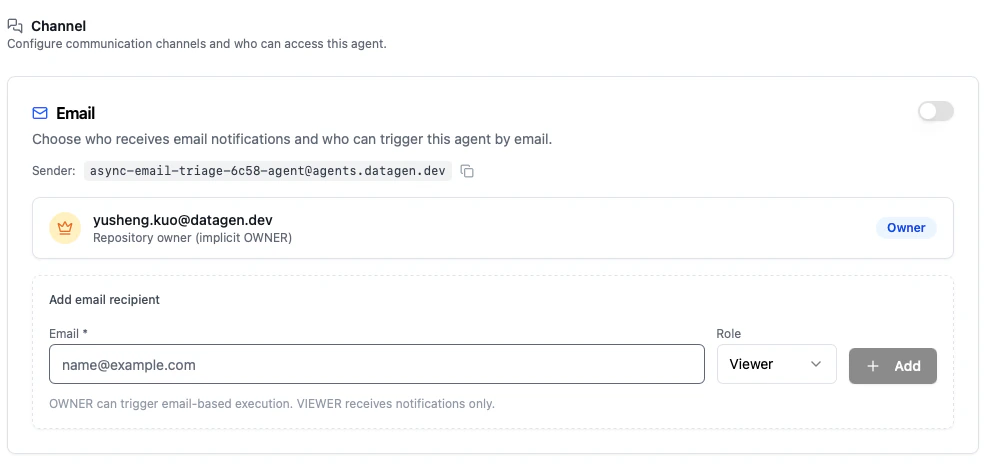 * **Sender address** -- Each agent gets a unique email address (e.g., `agent-name@agents.datagen.dev`)
* **Owner** -- Can trigger the agent by email and receives notifications
* **Viewer** -- Receives notifications only
* **Email allowlist** -- Restrict which email addresses can interact with this agent
* **Success/Failure notifications** -- Choose whether to send emails on successful runs, failed runs, or both
***
## Slack Per Agent
Pick which Slack channels this specific agent posts to and who can trigger it:
* **Sender address** -- Each agent gets a unique email address (e.g., `agent-name@agents.datagen.dev`)
* **Owner** -- Can trigger the agent by email and receives notifications
* **Viewer** -- Receives notifications only
* **Email allowlist** -- Restrict which email addresses can interact with this agent
* **Success/Failure notifications** -- Choose whether to send emails on successful runs, failed runs, or both
***
## Slack Per Agent
Pick which Slack channels this specific agent posts to and who can trigger it:
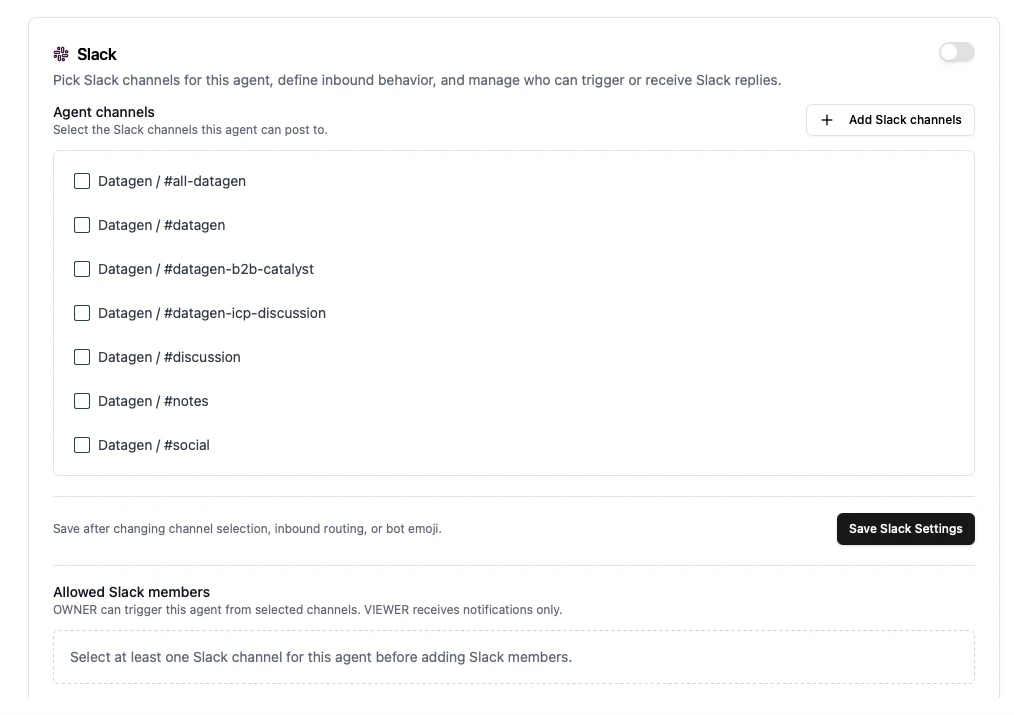 * **Agent channels** -- Select which Slack channels this agent can post to
* **Enable inbound** -- Allow Slack replies in those channels to trigger the agent
* **Allowed Slack members** -- Control who can trigger the agent (Owner) and who receives notifications only (Viewer)
* **Custom emoji** -- Set a bot emoji for this agent's messages
Click **Save Slack Settings** after making changes.
***
## Settings Hierarchy
Per-agent settings override global defaults. If a per-agent setting is not configured, the global default applies.
| Setting | Global (Account) | Per-Agent |
| ---------------------- | ---------------------- | ------------------ |
| **Email enabled** | Default for all agents | Override per agent |
| **Slack enabled** | Default for all agents | Override per agent |
| **Notify on success** | Default behavior | Override per agent |
| **Notify on failure** | Default behavior | Override per agent |
| **Reply-to-resume** | Default behavior | Override per agent |
| **Slack destinations** | Available channels | Selected per agent |
| **Email allowlist** | -- | Per agent |
***
## Channel Setup During Deployment
When deploying an agent through the web UI, you can configure channels as part of the setup:
1. **Select channels** -- Toggle Email and/or Slack
2. **Configure Slack** -- Select channels for this agent
3. **Review** -- Confirm notification preferences before deploying
You can always update channel settings after deployment from the agent's configuration page.
* **Agent channels** -- Select which Slack channels this agent can post to
* **Enable inbound** -- Allow Slack replies in those channels to trigger the agent
* **Allowed Slack members** -- Control who can trigger the agent (Owner) and who receives notifications only (Viewer)
* **Custom emoji** -- Set a bot emoji for this agent's messages
Click **Save Slack Settings** after making changes.
***
## Settings Hierarchy
Per-agent settings override global defaults. If a per-agent setting is not configured, the global default applies.
| Setting | Global (Account) | Per-Agent |
| ---------------------- | ---------------------- | ------------------ |
| **Email enabled** | Default for all agents | Override per agent |
| **Slack enabled** | Default for all agents | Override per agent |
| **Notify on success** | Default behavior | Override per agent |
| **Notify on failure** | Default behavior | Override per agent |
| **Reply-to-resume** | Default behavior | Override per agent |
| **Slack destinations** | Available channels | Selected per agent |
| **Email allowlist** | -- | Per agent |
***
## Channel Setup During Deployment
When deploying an agent through the web UI, you can configure channels as part of the setup:
1. **Select channels** -- Toggle Email and/or Slack
2. **Configure Slack** -- Select channels for this agent
3. **Review** -- Confirm notification preferences before deploying
You can always update channel settings after deployment from the agent's configuration page.