
apt / pip / uv / npm packages, optional internal package
registries, and CPU / memory / disk sizing.
DataGen bakes the recipe into an image in the background. Anything bound to the
environment then starts from the baked image, so nothing is installed at run
time and every run sees the same package versions.
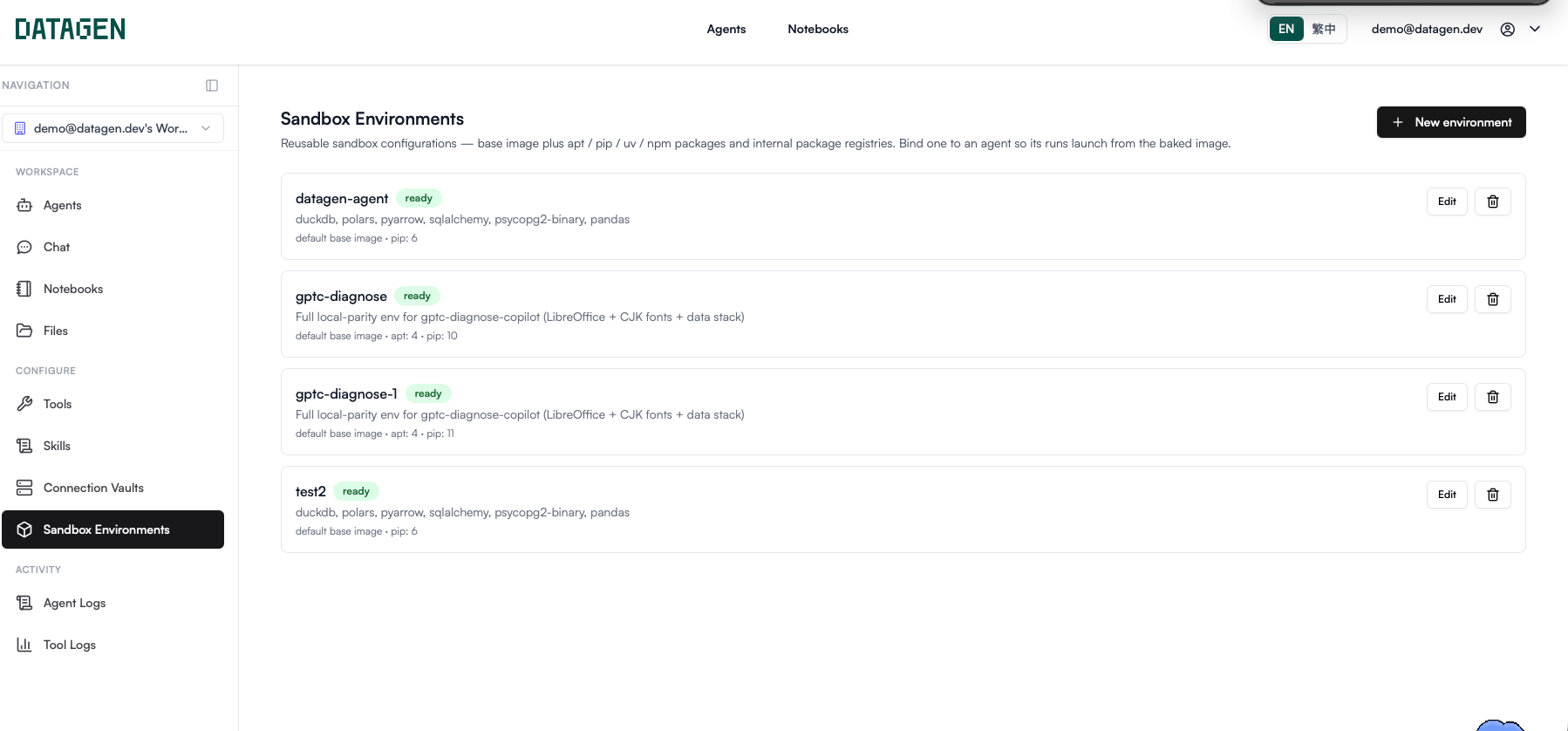
Open Sandbox Environments
Open the More menu on the left rail and choose Sandbox Environments. Use Pin to sidebar to keep it on the rail.If Sandbox Environments is not in the menu, the feature is not enabled for
your account. Agents then run on the standard image. Contact DataGen to enable
it.
Create an environment
1
Start the dialog
Click New environment.
2
Optionally start from a template
Pick a template under Start from template (optional). It pre-fills the
packages; you can edit anything before creating.
3
Name it and list packages
Enter a Name, then fill in the package fields you need.
4
Create
Click Create. The build starts in the background and the card shows its
progress.
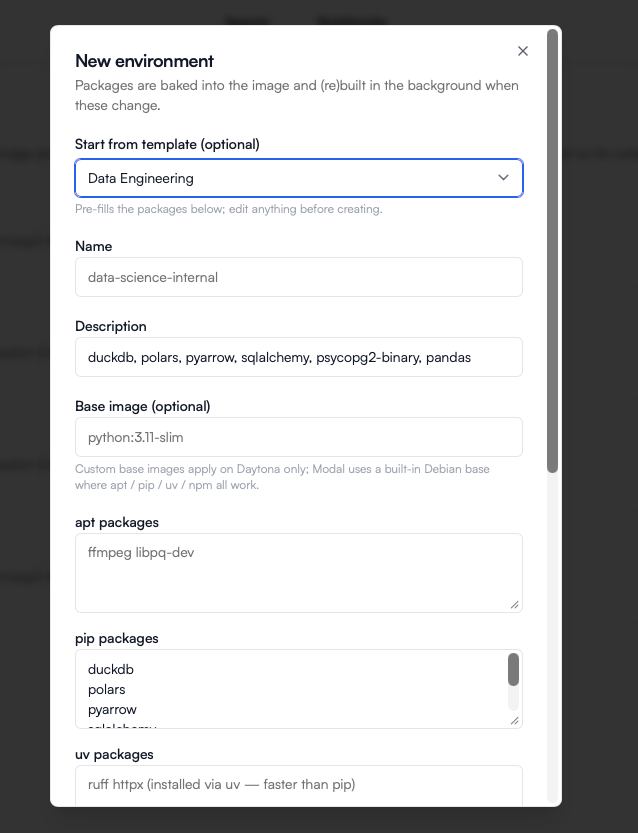
Built-in templates
A template is copied into the new environment. Editing the environment later
never changes the template, and vice versa.
Fields
Package lists accept spaces, commas, or new lines as separators. Pin versions
without spaces, for example
pandas==2.2.2, psycopg[binary], or
@scope/tool@1.4.0.
Modal vs Daytona. DataGen Cloud runs sandboxes on Modal; on-prem
deployments use Daytona. On Modal the Base image and Disk settings are
ignored. On Daytona, resources are part of the image itself, so changing them
rebuilds the image.
Build status
DataGen builds the image whenever the build inputs change — base image, packages, registries, or resources. Each card shows an agent status badge:
Notebook apps use a separate notebook image built from the same recipe. Its
badge appears once it has been requested; use Build notebook image (or
Retry notebook build) on the card. Notebook sandboxes always get at least
10 GB of disk.
The App images table below the list shows dependency images each custom app
bakes when you save it. They are managed by the app; you can delete one that no
live version boots from.
How agents, contexts and apps use an environment
Leaving an agent on Default (standard image) runs it on DataGen’s standard
image.
Gotchas
Agent run fails right after editing an environment
Agent run fails right after editing an environment
Every change to packages, registries, base image, or resources starts a
rebuild, and agents bound to the environment refuse to run until it is
ready again. Make edits when no scheduled run is due, or wait for the
badge to turn green.
Deleting an environment
Deleting an environment
Agents that use it fall back to the standard image — without its packages.
Rebind them to another environment first if their code imports anything
from it.
Installing at run time instead
Installing at run time instead
Code can still
pip install inside a sandbox when it has outbound network,
but it pays the install on every run and can drift between runs. Bake
anything used more than once.Alpine / musl base images
Alpine / musl base images
Many binary wheels, such as
psycopg2-binary, ship only for glibc. On a musl
base, choose packages that publish musl wheels (for example psycopg[binary]).Next
Harness
Choose the agent runtime, pin its version, and route it to your own LLM gateway.
Query a Database from Code
A worked example using the Data Engineering template.